


RAM
4.73.08K Reviews
App Specs
- Version
- 1.99.704
- Updated On
- License
- Free
- Downloads
- 500,000+
- Developer
- FCA US LLC
- Categories
- Lifestyle
- Platform
- Android, iOS
Screenshots
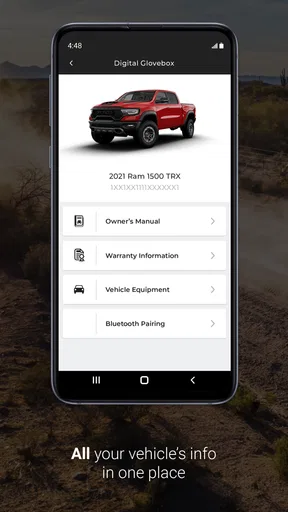
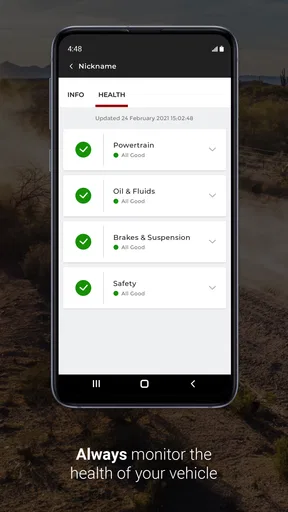
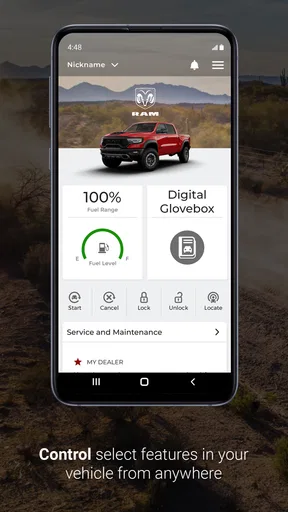
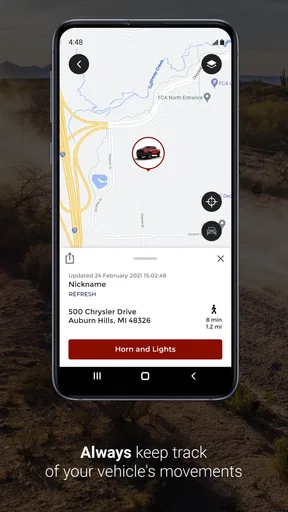
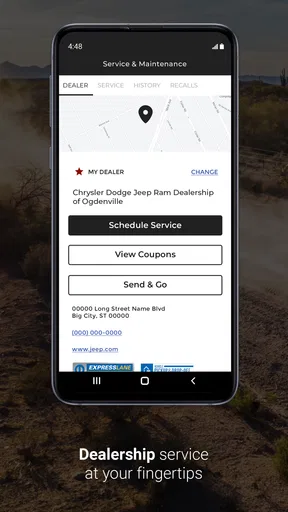
 Analysis by AppCompare
Owning a RAM truck often means keeping more information in your head than you expect: service needs, vehicle details, roadside help, ownership documents, and the small questions that appear when you are away from home. RAM is built around one useful idea: putting ownership support in one mobile place instead of making you search through unrelated websites, paper manuals, and general-purpose automotive apps. I found that focus more valuable than a long list of flashy extras.
This free lifestyle app comes from FCA US LLC and is aimed specifically at RAM owners. It is rated for Everyone, works on devices running Android 9 or later, and its current version is 1.99.704. The audience is already substantial, with more than 500,000 installs, while its 4.7 average from roughly 20,000 ratings suggests that many users find the ownership-centered approach worthwhile.
My main takeaway is simple: RAM is most useful when you treat it as a quick reference point for your truck, not as a replacement for every automotive service you already use. That distinction matters. It can make ownership less scattered, but its value depends on whether you want a RAM-specific companion rather than a broad vehicle-management platform.
Putting RAM-specific ownership help in one place
I use this section to look at the practical value of having RAM-oriented help together, especially when a small question comes up before a trip or task. The key is knowing when a focused starting point can save effort—and when a separate source is still the sensible next step.
The capability that makes the app worthwhile
The strongest capability here is the app’s narrow focus on RAM ownership. Instead of presenting a generic dashboard for any car, it is designed around the relationship between a driver and a RAM vehicle. That makes the experience feel more relevant when I am trying to answer an ownership question quickly.
A general automotive app may be better for comparing fuel costs across several vehicles, tracking every expense in a household, or managing cars from different manufacturers. RAM takes the opposite route. Its usefulness comes from reducing the distance between the owner and the brand-specific information that matters to that owner.
That focus is especially helpful for people who use their truck for more than commuting. A RAM may be a work vehicle during the week, a towing vehicle on weekends, and a family vehicle on longer trips. In those situations, switching between a manufacturer site, a saved document, a roadside service app, and a dealer search can become irritating. Having a RAM-oriented starting point gives the process more structure.
Worth Reading Before You Choose

EA SPORTS FC Mobile 26 Is a Bigger Football Game, but It Takes Time

Flipboard Shows What News Apps Must Do Beyond the Feed

Switching to Android Auto Means Rethinking Your Driving Routine

Google Calendar Makes a Crowded Week Easier to Manage

Ludo King Makes the Most of the Minutes Between Plans

Baby Panda World Brings Quick Play to Modern Phones, but Its Game Library Feels Busy
I would not describe this as an app that transforms the driving experience. It does something quieter: it makes ownership tasks easier to begin. That is a realistic benefit, but it is also the reason expectations should stay sensible. If you want navigation, fuel-price hunting, detailed expense accounting, or a complete trip planner, you will probably still need other tools.
Why a manufacturer-specific app can beat a generic alternative
Generic automotive apps usually win through breadth. They can cover multiple makes, combine vehicle records, or offer flexible reminders. The trade-off is that their information often feels detached from the particular truck sitting in your driveway. A manufacturer-specific app has a better chance of making the first step feel direct and familiar.
For a RAM owner, that can reduce the need to translate generic advice into truck-specific context. I do not have to begin by explaining to a general app which brand I own before looking for relevant ownership material. The app’s identity already points in the right direction.
That does not automatically make it the best option for everyone. Someone managing a RAM, a family sedan, and a motorcycle may prefer one neutral garage app. A person who already has a carefully organized digital folder and a trusted service relationship may find limited reason to add another ownership tool. RAM is strongest when convenience and brand focus matter more than having one universal system.
How the experience works in everyday ownership
Here I consider how a phone-based ownership companion fits around routines such as preparing the truck, checking information while parked, and sharing the vehicle with someone less familiar with it. Those habits matter more than opening an app simply because it is installed.
Using it before a trip
I see the app being most useful before a journey rather than during active driving. When preparing to tow, haul equipment, or travel a long distance, I want vehicle-related information available before I leave the driveway. That is the moment when a focused companion can save time: I can check what I need, settle small questions, and avoid searching while distracted on the road.
A practical routine would be to open RAM while the truck is parked, review the information relevant to the upcoming use, and then put the phone away. This is a better workflow than trying to investigate a vehicle issue at a fuel stop or while standing beside a busy road. The app is most helpful when it supports preparation, not when it encourages phone use behind the wheel.
For occasional owners, this preparation step may be even more valuable. If I drive the truck only on weekends or use it seasonally, I may not remember every ownership detail from one trip to the next. A dedicated app gives me a consistent place to start instead of relying on memory.
A realistic roadside scenario
Imagine leaving for a family trip and noticing a question about the truck after loading everything. It is not necessarily an emergency; it may be a basic ownership question that feels urgent because the departure time is close. In that situation, I would rather consult a RAM-focused resource while parked than search through random results and hope the wording applies to my vehicle.
The important benefit is not that the app magically solves every problem. Its value is that it can help me decide what to do next with less friction. If the issue needs professional attention, I still need a qualified service provider. If it is a simple information question, a dedicated reference point may prevent an unnecessary detour.
For genuine emergencies, I would not rely on an app alone. I would use the appropriate emergency or roadside channel first, then use RAM as supporting information when it is safe and relevant. That is one of the clearest boundaries of the product: it can organize ownership help, but it should not replace judgment, professional assistance, or emergency services.
Keeping the app useful instead of merely installed
Many vehicle apps are downloaded with good intentions and then forgotten. I think RAM works better when it becomes part of a small ownership routine. Opening it before a major trip, checking it when a maintenance question comes up, and revisiting it after changing vehicles are more practical than expecting daily value.
I also recommend keeping the app in an easy-to-reach location on the phone rather than burying it in a folder. That sounds minor, but convenience is the entire point of a companion app. If I have to search through several screens to find it, I am more likely to use a browser or rely on memory instead.
Another useful habit is to separate information gathering from action. I can use the app while parked to understand a question, then make the call, schedule service, or continue the trip without repeatedly handling the phone. This makes the app fit naturally into responsible ownership rather than turning it into another source of distraction.
What the version and device requirement mean
The current release is version 1.99.704, and the minimum operating-system requirement is Android 9. That requirement is comfortable for many Android users, but it still matters if you keep an older phone in the truck or use a spare device for travel. I would check compatibility before depending on it for a trip.
Because the app is free, trying it does not require a purchase decision. The more important question is whether it fits your habits. A free download is worthwhile when it removes repeated searching; it is less useful when it simply duplicates information you already access effortlessly.
The best scenario for RAM
This section focuses on the moments when a dedicated RAM resource is most likely to earn a place on my phone: a change in how the truck will be used, a journey that deserves preparation, or a handoff to another driver. I also weigh that usefulness against the limits of relying on a mobile tool at the wrong time.
Owners who use their truck for varied jobs
The clearest match is a RAM owner whose vehicle changes roles throughout the week. A truck used for commuting may not need much specialized attention every day, but towing, transporting tools, carrying supplies, and taking long trips create more moments when brand-specific ownership information is useful.
In that situation, I would keep RAM available as a pre-use check. Before towing, I could review the relevant ownership information while parked. Before a long trip, I could use it as part of a broader preparation routine. Before handing the truck to another family member, I could point them toward the same dedicated resource instead of explaining where every document is stored.
This is not about turning the app into a checklist for every possible truck task. It is about having a dependable starting point when the vehicle is being used outside the ordinary commute.
Newer owners and occasional drivers
New RAM owners may gain more from the app than experienced drivers because they are still building their own reference system. The first months of ownership often involve learning where information lives and which questions deserve a dealer, a manual, or a service professional. A brand-specific companion can shorten that learning curve.
Occasional drivers also benefit because they have fewer opportunities to remember details naturally. Someone who drives mostly during vacations or weekend projects may appreciate a dedicated place to revisit ownership information before using the truck after a long gap.
By contrast, highly experienced owners who already know their vehicle well may use the app only occasionally. That is not a flaw; it simply means the benefit is situational. The app earns its place through convenience at particular moments, not necessarily through constant daily engagement.
Families sharing one RAM
Shared vehicles create a less obvious use case. When several people drive the same truck, each person may have a different level of familiarity with it. A RAM-focused app can give less experienced drivers a common reference point, reducing the need to ask the most knowledgeable family member every small question.
I would still encourage families to agree on basic safety and service procedures separately. An app can support communication, but it cannot replace a clear conversation about who handles maintenance, what to do during a breakdown, or when a vehicle should not be driven.
Trade-offs I noticed before recommending it
I look at the trade-offs that affect a real recommendation, from needing a compatible phone and a suitable connection to keeping other trusted resources available. A focused companion can reduce searching, but sensible preparation means not making any single app the only route to help.
Its focus is also its limitation
The RAM-specific approach is the app’s main strength, but it narrows its usefulness. If I want one place to manage several vehicle brands, compare household running costs, or build a detailed maintenance history across a garage, a broader automotive app may be a better fit.
Likewise, drivers who expect a complete navigation, fuel, parking, or expense-management package may be disappointed if they approach RAM as an all-in-one driving platform. I would pair it with the tools I already trust rather than uninstalling everything else.
This is a companion for RAM ownership, not a universal replacement for the rest of a driver’s toolkit. Understanding that before downloading it prevents the most common mismatch between expectations and experience.
Convenience depends on context
An app can be faster than a website, but only when the phone is available, charged, compatible, and safe to use. If I am in a poor-signal area, dealing with a roadside problem, or standing outside in bad weather, I do not want the app to be my only source of help. I would prepare important trips with the same common sense I use for any digital tool.
That means keeping essential documents and emergency contacts accessible in another way when necessary. RAM can be part of that preparation, but it should not create a single point of failure. The best ownership setup combines the app with the vehicle’s physical documentation and appropriate service contacts.
Free does not mean frictionless
The absence of a price makes the app easy to try, but installing it is only the first step. I still need to decide whether the information is organized in a way that matches my habits and whether I will remember to open it when it matters. A free app that I never use has no practical value.
I also prefer to judge it by specific tasks rather than by the number of screens or options it offers. If it helps me find the right ownership information before a trip, it is doing its job. If I am opening it only because I feel I should, then a simpler saved document or direct website shortcut may be more efficient for me.
Who should choose something else
I would skip RAM if you do not own a RAM vehicle, if you need one system for multiple makes, or if your priority is detailed financial tracking. A generic vehicle-management app will usually make more sense for those needs. I would also look elsewhere if your main goal is navigation or live travel information rather than manufacturer-specific ownership support.
That advice is not a criticism of the app. It is a reminder that a focused tool should be judged against the job it was designed to support. RAM makes the most sense when the truck itself is the center of the task.
Who gets the most from this companion
To close, I consider which owners are most likely to find this companion worthwhile and who may be better served by a broader vehicle tool. My recommendation depends less on how often someone opens it than on whether RAM-specific information solves a recurring ownership need.
The strongest audience
I recommend RAM most readily to current RAM owners who want a convenient brand-specific reference on an Android phone. It is especially sensible for people who take road trips, use their truck for work or towing, share it with family, or simply dislike hunting through several sources whenever an ownership question appears.
The app’s Everyone content rating also makes it approachable for households where different people may need to consult it. That does not mean every driver needs to use it constantly. It means the product is easy to position as a shared ownership resource rather than a specialist tool for one technical audience.
Its strong reception—an average of 4.7 across about 20,000 ratings and roughly 3,100 written reviews—supports the idea that the focused approach works for many users. I would treat that as encouragement to try it, not as a guarantee that every RAM owner will have the same experience.
My practical recommendation
I would install RAM before a long journey, a towing weekend, or a period when another driver will be using the truck. I would explore it while parked, decide which parts are genuinely useful to my ownership routine, and then keep it available for those moments. That approach gives the app a fair test without expecting it to become the center of every drive.
For me, the deciding question is not whether it replaces all other automotive apps. It does not need to. The better question is whether a RAM-specific companion saves enough searching and uncertainty to justify a place on my phone. For owners who answer yes, this free lifestyle app is a practical addition. For drivers seeking a complete multi-vehicle management suite, a broader alternative will probably serve them better.
Overall, RAM succeeds because it stays close to the ownership problem it is meant to address. I like it as a prepared, parked-use tool: something I can consult before setting off, before using the truck for a less familiar job, or when I need a brand-focused starting point. If your RAM is an important part of work, travel, or family life, the app is worth trying; if you only want a universal driving toolbox, choose a more general solution.
Pros
- Shows detailed RAM usage by apps and running processes.
- Helps identify which apps consume the most memory.
- Useful for monitoring performance during everyday use.
- Presents memory statistics in an easy-to-understand format.
- Can support troubleshooting slowdowns and app reloads.
Cons
- Some features may require permissions or extra system access.
- RAM readings can vary depending on the device and Android version.
- Closing apps manually may not improve battery life or performance.
- Advanced information may be confusing for inexperienced users.
- Frequent monitoring can encourage unnecessary task management.
FAQs for RAM
What is RAM, and why is it important on a phone or computer?
RAM, or Random Access Memory, is the short-term memory used by your device to keep apps, games, and system processes running. More available RAM generally allows you to switch between applications more smoothly and reduces the need to reload content. However, RAM is only one part of overall performance; the processor, storage speed, operating system, and app optimization also have a significant impact.
Does having more RAM automatically make a device faster?
Not necessarily. Additional RAM can help when you regularly use demanding games, edit media, or keep many applications open, but it does not automatically improve every task. If your device already has enough memory, adding or freeing more RAM may produce little noticeable difference. Performance also depends on the chipset, storage technology, software quality, temperature, and how efficiently the operating system manages background processes.
Can a RAM app really increase the amount of available memory?
A RAM-management app cannot physically add more RAM to your device. Some applications close background processes or clear temporary memory, which may briefly show more available space. However, repeatedly force-closing apps can make the system reopen them later and may increase battery use. Android and iOS generally manage memory automatically, so these tools should be used carefully and only when they provide a clear, practical benefit.
Is it safe to use a RAM cleaner or memory optimizer?
Most reputable memory-management tools are safe when downloaded from the official Google Play Store or Apple App Store and given only necessary permissions. Nevertheless, users should review the privacy policy, developer information, advertisements, and requested access before installing. Avoid apps that promise unrealistic performance gains, request accessibility or device-administrator privileges without a clear reason, or encourage constant cleaning, since these behaviors may affect battery life and privacy.
How can I tell whether my device needs more RAM or better optimization?
Frequent app reloads, slow multitasking, stuttering in demanding games, and warnings about insufficient memory may indicate that your device is running short of RAM. Before downloading a cleaner, restart the device, remove unused apps, update the operating system, and keep sufficient storage available. If problems continue, the limitation may be the processor, aging battery, overheating, or slow storage rather than RAM alone.


